
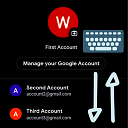
Switch between Multiple Google Accounts
ID
nlmcbmeicbooompjafliaoiodifdhnpdKeyboard shorcuts to Switch between Multiple Google Accounts
Screenshot
Descrizione
Keyboard shorcuts to Switch between Multiple Google Accounts
Keyboard shortcuts to Switch between different accounts of various Google products.
You can use any one of the below two shortcuts (If one of the below doesn't work or is assigned to other plugin you can use the other one ) -
1) Press ALT+ 1, ALT + 2, .... ALT+9 to switch to first, second, third.. google account.
2) Press SHIFT+ 1, SHIFT + 2, ... SHIFT +9 to switch to first, second, third.. google
account.
It works on:-
Gmail
Drive
Meet
Calendar
Docs
Sheets
Slides
Forms
Keep
Photos
Maps